Poco X5 Pro is the performance mid-ranger of the Poco X series — Snapdragon 778G, a 6.67-inch Flow AMOLED screen at 120 Hz, a 108 MP camera and 67W charging — and it is already on the mobilelcdled.com finder as Poco X5 Pro (22101320G, panel type AMOLED). This guide covers the full phone: display, battery, charging flex, on/off (side key) strip, main board, long flex and body — so a shop or a buyer can check exactly what they are ordering before they pay.

Most-searched keywords this article answers
Poco X5 Pro display price, X5 Pro LCD replacement, Poco X5 Pro 5G screen replacement, Poco X5 Pro original display, X5 Pro 22101320G display, Poco X5 Pro battery replacement, X5 Pro battery BP4K, Poco X5 Pro charging port repair, X5 Pro charging flex, Poco X5 Pro power button not working, X5 Pro on off strip, X5 Pro side key flex, Poco X5 Pro motherboard, Poco X5 Pro back cover replacement, X5 Pro body parts, X5 Pro spare parts, Poco X5 Pro display compatibility, Poco X5 Pro vs Redmi Note 12 Pro 5G, Poco X5 Pro vs Poco X6 Pro display.
Display specs
- Model on the finder: Poco X5 Pro (22101320G), panel type: AMOLED
- Screen: 6.67-inch Flow AMOLED, 1B colours, 10-bit colour depth, DCI-P3, flat display
- Resolution: 1080 x 2400 pixels (FHD+, ~395 ppi), 20:9 ratio
- Refresh rate: 120 Hz, Dolby Vision, HDR10+
- Brightness: 500 nits (typical), 900 nits (HBM / peak)
- Protection: Corning Gorilla Glass 5
- Fingerprint: side-mounted sensor, in the power button — NOT part of the display assembly, so a display swap does not touch the fingerprint sensor, unlike phones with an under-display sensor
Full mobile specification
Types / variants — which X5 Pro is which
- Model numbers: 22101320G (global), 22101320I (India) — both are the same phone for display and parts purposes; always confirm the exact model number before ordering a part. The complete specification table lists both numbers.
- Storage + RAM types: 128 GB + 6 GB RAM, 256 GB + 8 GB RAM
- RAM type: LPDDR4X; storage type: UFS 2.2; Dynamic RAM expansion 3.0
- SIM types: Nano-SIM + Nano-SIM (dual SIM, dual standby 5G+5G)
- Colours: Astral Black, Horizon Blue, Poco Yellow
- Launched: announced 6 February 2023, released 7 February 2023
- Software: Android 12 with MIUI 14 for POCO at launch, upgradable to Android 13
Processor details
- Chipset: Qualcomm SM7325 Snapdragon 778G 5G (6 nm)
- CPU: octa-core — 1x 2.4 GHz Cortex-A78 + 3x 2.2 GHz Cortex-A78 + 4x 1.9 GHz Cortex-A55
- GPU: Adreno 642L
- For repair: the processor is soldered on the main board, so a processor fault is a board-level repair, not a part swap
RAM and storage details
- RAM: 6 GB or 8 GB depending on variant (LPDDR4X)
- Storage: 128 GB or 256 GB, UFS 2.2 fast storage
- No memory card slot: storage cannot be expanded, so a buyer choosing a used X5 Pro should check the storage size first, because it cannot be changed later
Charging type details
- Wired charging: 67W turbo charging — 100% in about 45 minutes advertised; PD3.0 and QC4 supported; 5W reverse wired charging
- Wireless charging: none — this phone charges by cable only
- Port: USB Type-C 2.0 with OTG support
- In practice: the 67W adapter is in the box, and a weak charging board will never deliver full 67W speed even with the right charger — so the charging board matters as much as the charger
Camera details
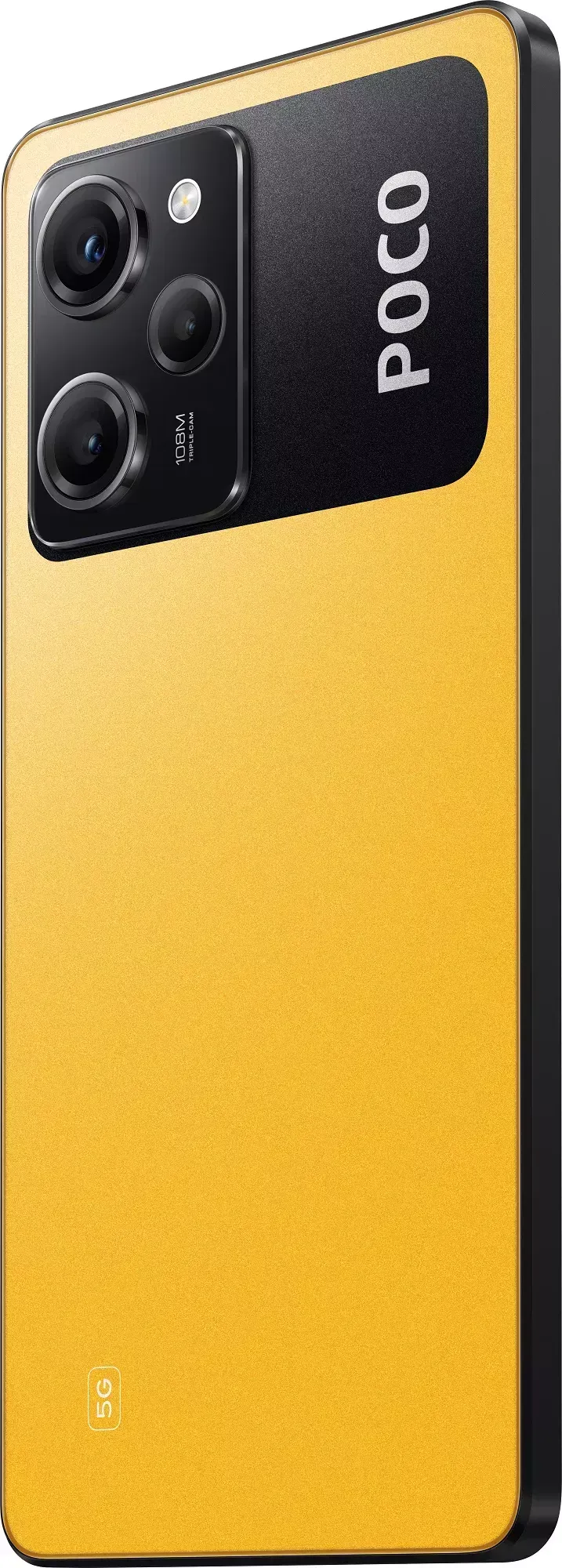
- Rear cameras (triple): 108 MP wide, f/1.9, 1/1.52", 0.7µm, PDAF (9-in-1 binning into one large 2.1µm pixel); 8 MP ultra-wide, f/2.2, 120-degree view; 2 MP macro, f/2.4
- Rear video: 4K at 30 fps, 1080p at 30/60/120 fps, gyro-EIS stabilisation; LED flash, HDR, panorama, VLOG, slow motion, time-lapse
- Front camera: 16 MP wide, f/2.4; video 1080p at 30/60 fps
- For repair: the three rear lenses sit in one black camera island on the back cover. A cracked island glass is a back-cover job; a faulty lens itself means the camera module needs attention, not just the glass
Sound details
- Loudspeakers: dual speakers (stereo) — 24-bit/192kHz Hi-Res audio
- 3.5mm headphone jack: yes — unlike the newer Poco X6 Pro and X7 Pro, this model still has the jack, so a buyer who uses wired earphones should check for it
- Other connectivity: Wi-Fi 802.11 a/b/g/n/ac/6 (ax on the official spec page), dual-band, Wi-Fi Direct; Bluetooth 5.2 (international) / 5.1 (India), A2DP, LE; NFC (market/region dependent); infrared port; GPS / GLONASS / BDS / GALILEO / QZSS
- Sensors: side-mounted fingerprint, accelerometer, gyro, proximity, ambient light, compass; face unlock via the front camera
Display / LCD — front side and back side pictures
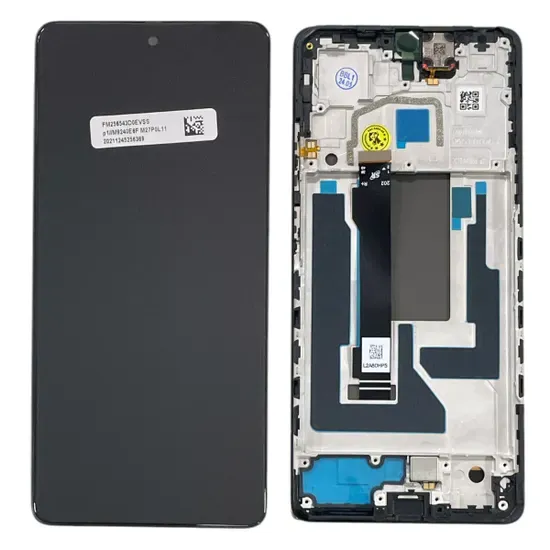
A replacement X5 Pro display is sold two ways: with frame (the panel already fitted in the frame) and without frame (panel only, fitted into the old frame). Both are the same 6.67-inch AMOLED panel in the original; the fitting work is different, so always confirm which one a seller is quoting.

If you need the Poco X5 Pro display, contact us through our Contact page for price and availability.
What the compatibility finder says — honestly
As of this draft, Poco X5 Pro shows NO compatible models on the finder — and on current evidence that blank is mostly right, with one strong candidate to check:
- Candidate only, NOT confirmed: Redmi Note 12 Pro 5G. The Note 12 Pro 5G is the X5 Pro's Poco twin — the same 6.67-inch AMOLED 120 Hz 1080 x 2400 panel, the same body size (162.9 x 76 x 7.9 mm), the same 5000 mAh battery and the same 67W charging — and parts sellers list ONE screen for both models (the with-frame assembly pictured above is sold as "Redmi Note 12 Pro 5G / Poco X5 Pro"). The chipset is different (Dimensity 1080 in the Note 12 Pro 5G against Snapdragon 778G here), but that does not affect the display. No Xiaomi service-pack number tying the two displays together was verified for this draft, so the finder still shows both blank — confirm from shop fitment before ordering one as a substitute.
- Same phone, different name: Redmi Note 12 Pro Speed (22101320C). The China version of the X5 Pro — same Snapdragon 778G, same display, same model-number family (22101320). Same candidate status as the Note 12 Pro 5G: a lead to check, not a confirmed substitute.
- NOT compatible: Poco X6 Pro. The newer X6 Pro is a different phone — Dimensity 8300 Ultra, a 6.67-inch 1220 x 2712 (1.5K) AMOLED panel and a BM5T battery — so neither its panel nor its battery fits the X5 Pro. Do not fit an X6 Pro panel in an X5 Pro, and do not mix up their batteries either (X5 Pro: BP4K; X6 Pro: BM5T).
- NOT compatible: Poco X7 Pro. A different generation again — Dimensity 8400 Ultra, 1.5K AMOLED panel and a 6000 mAh battery. Nothing from it fits the X5 Pro.
- NOT confirmed: Poco X5 (plain). The plain X5 has the same 6.67-inch 1080 x 2400 screen size on paper, but no joint X5 / X5 Pro display listing was found, and the finder links the plain X5 to the Redmi Note 12 5G — not to the X5 Pro. Do not order a plain X5 panel as a substitute without a shop fitment test.
- Battery sharing is NOT display sharing. The X5 Pro battery BP4K is also listed for the Poco F5, the Redmi Note 12 Pro 5G, the Redmi Note 12 Pro 4G and the Redmi Note 12T — that is a battery fitment only. It says nothing about their displays. Do not fit an F5 screen in an X5 Pro on the strength of the shared battery.
That blank on the finder today is exactly why this section matters: before ordering an X5 Pro panel, search the exact model on mobilelcdled.com and check the compatibility list, rather than trusting a seller listing that groups every "X5" model together.
Full parts details
1. Battery — BP4K, 5000 mAh

- Part number: BP4K (printed on the battery label; the label also reads 1ICP5/62/89)
- Capacity: 5000 mAh typical, 4900 mAh rated, 19.3 Wh typical energy / 18.9 Wh rated
- Voltage: 3.87 V nominal; charging voltage limit 4.45 V; Li-ion polymer
- Charging: 67W wired fast charging; no wireless charging on this model; 5W reverse wired charging
- Battery sharing (battery only, not display): the same BP4K battery is listed for the Poco F5, the Redmi Note 12 Pro 5G, the Redmi Note 12 Pro 4G and the Redmi Note 12T
- Signs it needs replacing: phone swelling, battery draining fast, phone switching off at 20–30%, or not holding charge after a full charge
- Warning: a swollen battery must not be punctured or bent — replace it, do not keep using it. The battery flex connectors sit at the top of the battery.
If you need the Poco X5 Pro battery, contact us through our Contact page for price and availability.
2. Charging flex / charging board (sub board)
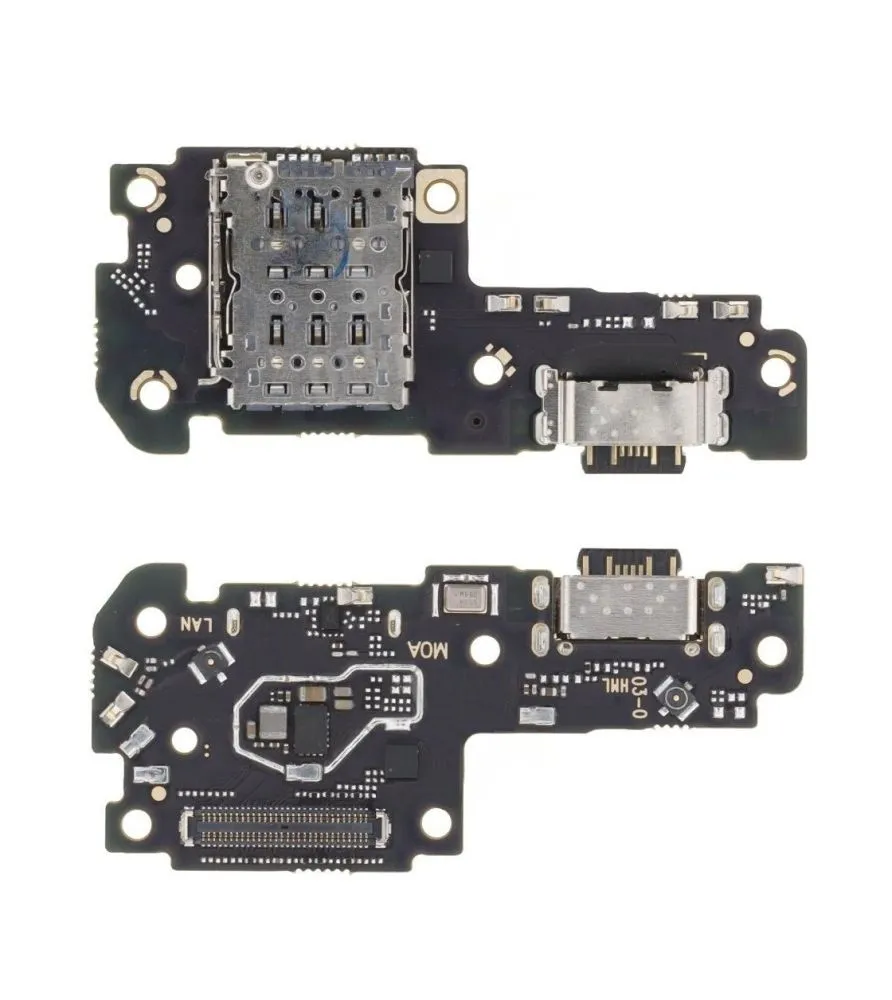
- What it is: the small board at the bottom of the phone carrying the USB-C charging port and the SIM tray slot. It connects to the main board through the long interconnect flex (see section 5).
- Board markings: "MOA" and "LAN" are printed on the board in the photo above; the board code "20-0 HML" is also visible.
- Service pack: no X5 Pro charging-board part number was verified for this draft, so none is printed here — do not order by a guessed number. (Lead only: the Redmi Note 12 Pro 5G's equivalent assistant board is listed under service pack 5600020M1600 — that is the Redmi part, not a verified X5 Pro number.)
- Signs it is faulty: phone not charging, charging only at one cable angle, loose USB-C port, microphone not working on calls, or 67W fast charging never kicking in even with the right charger
- Fitting note: the charging board is model-specific to 22101320G — a Poco X5 or X6 Pro charging board does not fit, even though the ports look alike
If you need the Poco X5 Pro charging flex, contact us through our Contact page for price and availability.
3. On / off strip — power button + volume flex (side key flex)
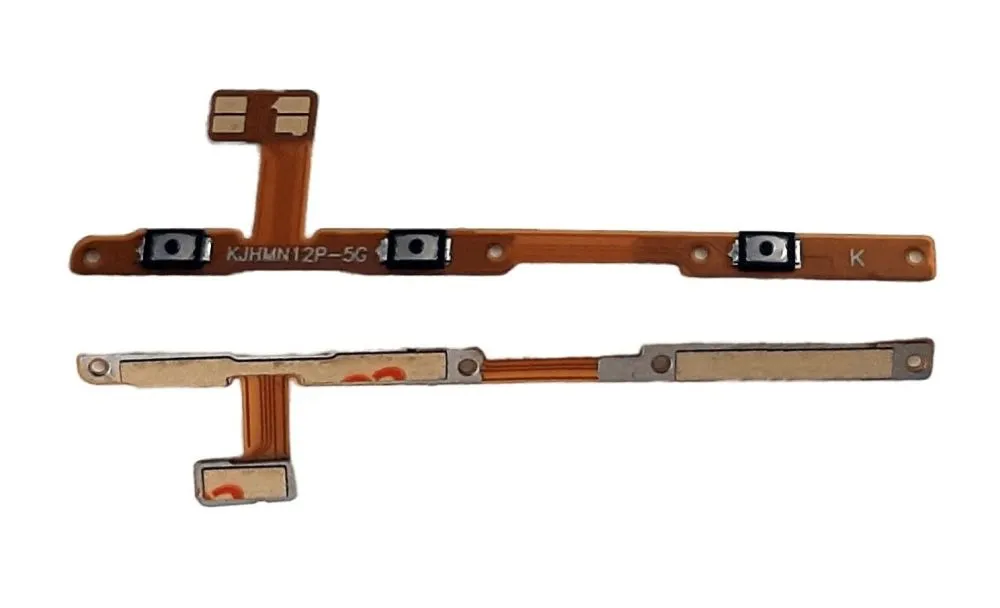
- What it is: one long flex strip carrying the power (on/off) button and the volume up/down buttons.
- Printed code: KJHMN12P-5G (printed on the flex in the photo above).
- Fingerprint warning: the fingerprint sensor is side-mounted in the power button, so a power-button / side-key job can affect fingerprint unlock — test the fingerprint sensor after fitting, before handing the phone back.
- Shared listing: the same side-key flex is listed for the Poco X5 Pro, the Redmi Note 12 Pro 5G and the Redmi Note 12 Pro+ — a side-key fitment share, not a display share.
- Signs it is faulty: power button not working, volume button stuck or double-pressing, or the phone restarting when a button is pressed
- Fitting note: this is a long, thin flex — it tears easily if pulled at an angle. Fit it with the frame buttons aligned first, then press the flex down, never the other way round.
If you need the Poco X5 Pro power button flex, contact us through our Contact page for price and availability.
4. Main board (motherboard)
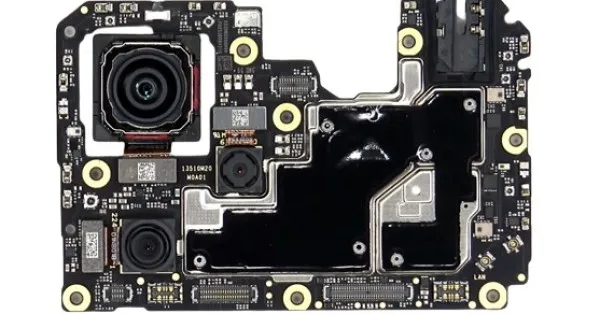
- Processor: Qualcomm Snapdragon 778G 5G (6 nm)
- Memory: 6 / 8 GB RAM (LPDDR4X); storage 128 GB / 256 GB (UFS 2.2, no microSD slot)
- The board carries the cameras, dual SIM 5G, Wi-Fi 6, Bluetooth 5.2 and the display/battery/charging connectors — so a board fault can look like a display, charging or network fault. Check the flexes and connectors first; they are cheaper than a board.
- Board-level repairs (no signal, no power, water damage) need a specialist — a board swap also changes the phone's identity, so data and IMEI checks matter before ordering one.
If you need the Poco X5 Pro main board, contact us through our Contact page for price and availability.
5. Long flex (interconnect flex) and LCD flex — do not mix them up
- Long interconnect flex: the long flex that runs between the main board (top) and the charging sub board (bottom). It carries charging, USB data and antenna signals. If it is damaged, the phone may stop charging, lose signal, or show a dead microphone — even though the charging board itself is fine.
- LCD flex: the short flex on the back of the display itself. It carries the picture and touch signals from the display to the main board. A torn LCD flex means lines, no touch, or a black screen, and it usually means replacing the whole display assembly, not just the flex.
- Rule for ordering: "long flex" = board-to-charging-board flex; "LCD flex" = the flex attached to the screen. Sellers sometimes list them under each other's names, so match the picture, not just the title.
- Part number note: no long-flex part number was verified for this draft, so none is printed here — do not order by a guessed number.
If you need the Poco X5 Pro long flex or display flex, contact us through our Contact page for price and availability.
6. Body details — frame, back glass, size and weight

- Size: 162.9 x 76 x 7.9 mm; weight: 181 g
- Frame: plastic frame; front glass Corning Gorilla Glass 5; back plastic
- Water resistance: IP53 (dust protected, splash resistant) — this rating is lost once the phone has been opened unless new adhesive seals are fitted
- Colours: Astral Black, Horizon Blue, Poco Yellow
- Camera island: the three rear lenses and the flash sit in one black island at the top left of the back cover, with "108M TRIPLE CAM" printed on it and the POCO name running vertically down the black panel — the quickest visual check that a phone (or a back cover) is an X5 Pro and not a plain Poco X5
If you need the Poco X5 Pro back glass or body parts, contact us through our Contact page for price and availability.
Why this matters for repair
- The X5 Pro's 6.67-inch AMOLED panel, 120 Hz refresh rate and 67W charging mean the replacement must be the exact 22101320G panel — not a look-alike from the Poco X6 Pro or X7 Pro, and not an Incell panel sold as "original". An Incell panel will light up, but the colours and brightness will not match the original.
- The side-mounted fingerprint is the one forgiving part of this phone: it lives in the power button, not in the screen, so it keeps working even with an Incell panel — unlike under-display fingerprint models. Test it after any side-key job all the same.
- Check the part number on every part before fitting: battery BP4K; side-key flex printed KJHMN12P-5G; charging board markings MOA / LAN; main board markings 13510M20 / MOA01. No display or charging-board service-pack number was verified for this draft, so none is printed here.
- If the Redmi Note 12 Pro 5G display sharing is confirmed from shop fitment, the finder — and this article — should be updated together, with the same (verify) honesty the site uses elsewhere.
Next articles in the same series (from the most-searched list)
Redmi Note 12 Pro 5G (the twin — its display story links straight into this article), Poco X6 Pro, Poco X7 Pro, Galaxy S24 Ultra, iPhone 15 Pro Max.