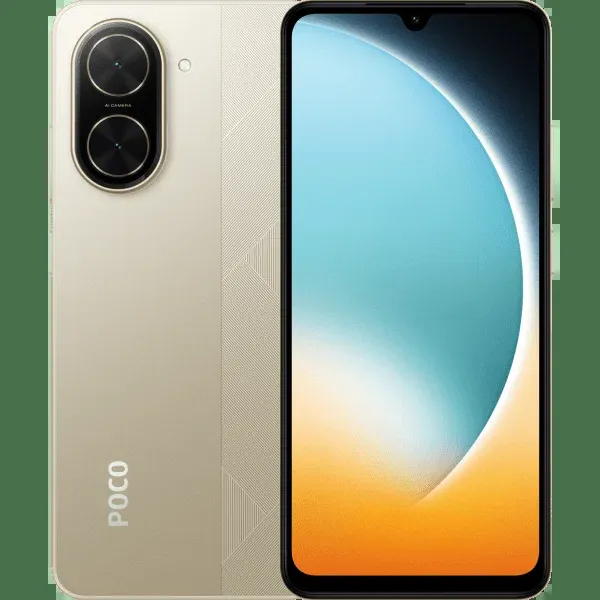
Poco C71 is the 2025 budget phone from Poco — the one with the Unisoc T7250, a big 6.88-inch 120 Hz IPS LCD display and a 5200 mAh battery — and it is one of the most-searched Poco phones in repair shops, because it sells in huge numbers at the lowest price and its screen is the part that breaks first. Read the name carefully before ordering anything: this is not the Poco C65 (Helio G85, smaller 6.74-inch 90 Hz screen, 5000 mAh battery) and not the Poco C75 (Helio G81 Ultra, 50 MP camera, 5160 mAh battery). This guide covers the Poco C71 only — model number 25028PC03G — display, battery, charging flex, on/off (side key) strip, main board, long flex and body, so a shop or a buyer can check exactly what they are ordering before they pay. It is already on the mobilelcdled.com finder as Poco C71 (25028PC03G, panel type LCD). Its closest cousin on paper is the Redmi A5 — same chipset, same battery size and same screen size — but whether the two phones actually share a display or a battery is still unconfirmed, and this article says so plainly instead of guessing (see the finder section below).
Most-searched keywords this article answers
Poco C71 display price, C71 LCD replacement, Poco C71 screen replacement, Poco C71 original display, C71 25028PC03G display, Poco C71 battery replacement, Poco C71 battery BP5E, Poco C71 charging port repair, Poco C71 charging flex, Poco C71 power button not working, Poco C71 on off strip, Poco C71 side key flex, Poco C71 motherboard, Poco C71 back cover replacement, Poco C71 body parts, Poco C71 spare parts, Poco C71 display compatibility, Poco C71 vs Redmi A5 display, Poco C71 vs Poco C65 display, Poco C71 vs Poco C75 display.
Display specs
- Model on the finder: Poco C71 (25028PC03G), panel type: IPS LCD
- Screen: 6.88-inch IPS LCD, 120 Hz refresh rate, up to 240 Hz touch sampling rate, wet-touch support
- Resolution: 720 x 1640 pixels (HD+, ~260 ppi)
- Refresh rate: 120 Hz
- Brightness: 450 nits (typ), 600 nits (HBM); contrast ratio 1500:1; 8-bit colour; 70% NTSC colour gamut; TÜV Rheinland Low Blue Light (software solution) and Flicker Free
- Protection: no front-glass type is stated on GSMArena or on Xiaomi's own spec page, so none is claimed here
- Fingerprint: side-mounted, in the power button — NOT under the display. So a display swap does not touch the fingerprint sensor, but a faulty side-key flex can kill both the power button and fingerprint unlock (see section 3)
Full mobile specification
Types / variants — which C71 is which
- Model numbers: 25028PC03G (global), 25028PC03I (India) — both are the same phone for display and parts purposes; always confirm the exact model number before ordering a part. 25028PC03G is the global model.
- Storage + RAM types: 64 GB + 3 GB RAM, 64 GB + 4 GB RAM, 128 GB + 4 GB RAM, 128 GB + 6 GB RAM (GSMArena). Xiaomi's UK page lists 3 GB + 64 GB and 4 GB + 128 GB only — the 6 GB RAM version is sold in some regions, so check the variant on the phone before ordering a board.
- Memory extension: up to 6 GB RAM with memory extension on the 3 GB version, up to 8 GB on the 4 GB version (uses storage space)
- SIM types: dual Nano-SIM (Nano-SIM + Nano-SIM), plus a dedicated microSDXC slot
- Colours: Power Black, Cool Blue, Desert Gold (GSMArena); Xiaomi's own pages list Black, Blue and Gold
- Launched: announced 4 April 2025, released 8 April 2025
- Software: Android 15 or Android 15 (Go edition), up to 2 major OS updates (GSMArena). Xiaomi's UK page lists Android 15 (Go Edition) — the Go edition is the version sold in most regions.
- Full specs are also listed on Poco's official C71 page
Processor details
- Chipset: Unisoc T7250 (12 nm)
- CPU: octa-core — 2x 1.8 GHz Cortex-A75 + 6x 1.6 GHz Cortex-A55
- GPU: Mali-G57 MP1
- For repair: the processor is soldered on the main board, so a processor fault is a board-level repair, not a part swap. And note the chipset before ordering a board: a Poco C65 board (Helio G85) or a Poco C75 board (Helio G81 Ultra) will not work in this phone, even though the phones look alike
RAM and storage details
- RAM: 3 GB, 4 GB or 6 GB depending on variant (LPDDR4X)
- Storage: 64 GB or 128 GB, eMMC 5.1
- Memory card slot: yes — dedicated microSDXC slot. The card has its own slot, so it does not take the place of a SIM.
Charging type details
- Wired charging: 15W wired fast charging, with a charger in the box in most regions
- Wireless charging: none — this phone charges by cable only
- Port: USB Type-C 2.0
- Charging time: Xiaomi's own FAQ puts a full charge at about 137 minutes — slow by today's standards, so a phone that charges even slower than that usually has a faulty charging board or cable, not a faulty battery (see section 2)
- In practice: 15W is less than the Poco C65's 18W and the Poco C75's 18W, so a C65 or C75 charging board will not make this phone charge any faster — and the charging board is a different part anyway (see section 2)
Camera details
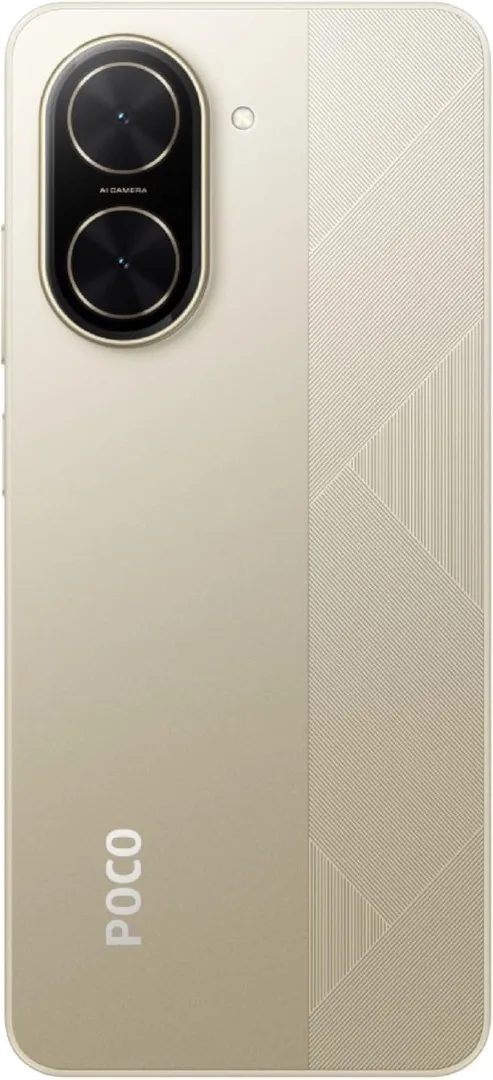
- Rear cameras (dual): 32 MP wide main camera (GSMArena lists f/1.8; Xiaomi's own spec page lists f/2.0 — the two sources disagree on the aperture, so neither figure is treated as settled here), plus an auxiliary lens
- Rear video: 1080p at 30 fps, 720p at 30 fps — this phone does not record 4K video. LED flash, HDR, Night mode, Film Camera mode
- Front camera: 8 MP wide, f/2.0, HDR; video 1080p at 30 fps, 720p at 30 fps
- For repair: the two big lenses and the flash sit in one vertical pill-shaped camera island on the back — the quickest visual check on a back panel. Do not order a Poco C65 camera module (50 MP main, 2 MP macro) or a Poco C75 camera module (50 MP main) for this phone: the sensor and the fitting are both different
Sound details
- Loudspeaker: yes (GSMArena does not say stereo or mono, so neither is claimed here)
- 3.5mm headphone jack: yes — audio works through wired earphones as well as USB-C and Bluetooth 5.2 (A2DP, LE, AAC / SBC)
- Other connectivity: Wi-Fi 802.11 a/b/g/n/ac (dual-band, 2.4 GHz + 5 GHz), FM radio (with headphone jack), GPS / GLONASS / GALILEO / BDS. No NFC and no infrared port on this model.
- Sensors: side-mounted fingerprint, accelerometer, electronic compass, virtual proximity sensor, virtual ambient light sensor
Display / LCD — front side and back side pictures
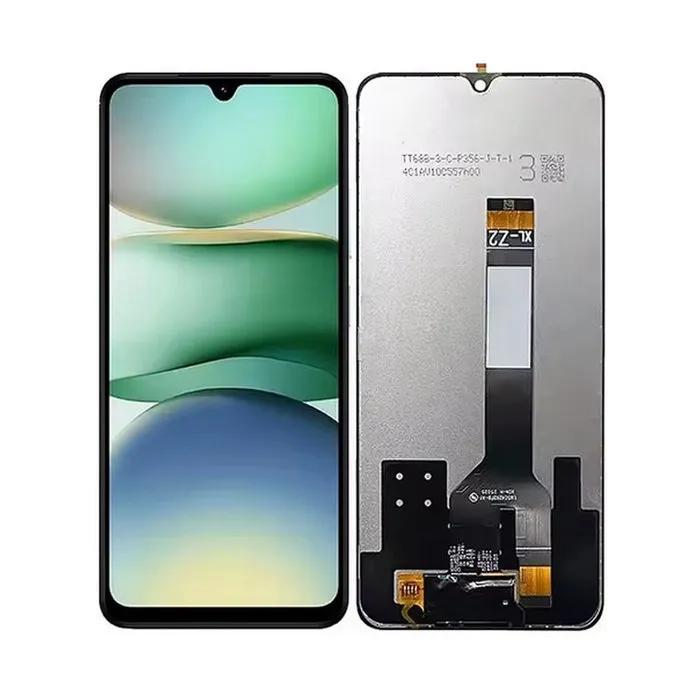
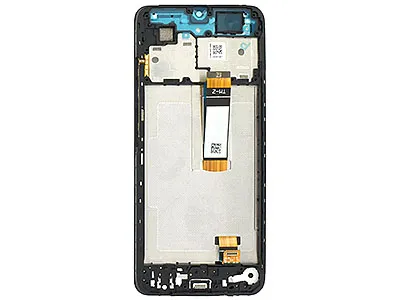
A replacement C71 display is sold two ways: with frame (the panel already fitted in the frame) and without frame (panel only, fitted into the old frame). Both are the same 6.88-inch IPS LCD panel; the fitting work is different, so always confirm which one a seller is quoting. Sellers also list the panel in two flex versions — a short-flex version and a long-flex version (see section 5) — so match the flex length in the photo, not just the model name. No Xiaomi display service-pack number was verified for this panel, so none is printed here.
If you need the Poco C71 display, contact us through our Contact page for price and availability.
What the compatibility finder says — honestly
As of this draft, the Poco C71 (25028PC03G) shows NO compatible models on the finder. That blank is honest, not missing research — and the one link everybody asks about is still unconfirmed:
- No confirmed shared display. The finder row "Poco C71" (25028PC03G, LCD) has an empty compatible list. No original-parts cross-reference was found linking this panel to any other model, so nothing is added here.
- NOT confirmed: Redmi A5 (25028RN03G). The C71 and the Redmi A5 look like twins on paper — same Unisoc T7250 chipset, same 6.88-inch 120 Hz IPS LCD at 720 x 1640, same 5200 mAh battery, and near-identical bodies (GSMArena: C71 171.8 x 77.8 x 8.3 mm, 193 g; A5 171.7 x 77.8 x 8.3 mm, 193 g) — and several parts sellers list one joint display for "Poco C71 / Redmi A5 4G", in both short-flex and long-flex versions. But seller grouping is not a confirmed original-parts match: no joint Xiaomi service-pack listing naming both models was verified, and the two phones carry different model numbers (25028PC03G against 25028RN03G). Do not fit a Redmi A5 panel in a Poco C71 on a seller's word alone — this one needs Ahmad's shop fitment check before the finder is changed.
- NOT confirmed: shared battery with the Redmi A5 either. The same sellers list the BP5E battery jointly for "Poco C71 / Redmi A5 4G", and the BP5E label (5100 mAh rated / 5200 mAh typical, 3.84 V) matches this phone's 5200 mAh rating exactly. That is strong listing evidence, not a confirmation — the battery code is printed here as the part sellers list for the C71, and the shared-battery link stays unconfirmed until Ahmad's shop check (see section 1).
- NOT compatible: Poco C65 (2310FPCA4G). Smaller 6.74-inch 90 Hz panel, Helio G85 instead of Unisoc T7250, 5000 mAh battery instead of 5200 mAh, and a smaller body (168 x 78 x 8.1 mm, 192 g). Its panel does not fit this phone.
- NOT confirmed: Poco C75 (2410FPCC5G). Same 6.88-inch 120 Hz panel size on paper and almost the same body (171.9 x 77.8 x 8.2 mm, 204 g), but a different chipset (Helio G81 Ultra), a different battery (5160 mAh) and a different camera (50 MP). Same screen size is not the same screen — do not assume the C75 panel fits until it is checked from shop fitment.
That blank on the finder today is exactly why this section matters: before ordering a C71 panel, search the exact model number (25028PC03G) on mobilelcdled.com and check the compatibility list, rather than trusting a seller listing that groups every "Poco C" model together.
Full parts details
1. Battery — BP5E, 5200 mAh
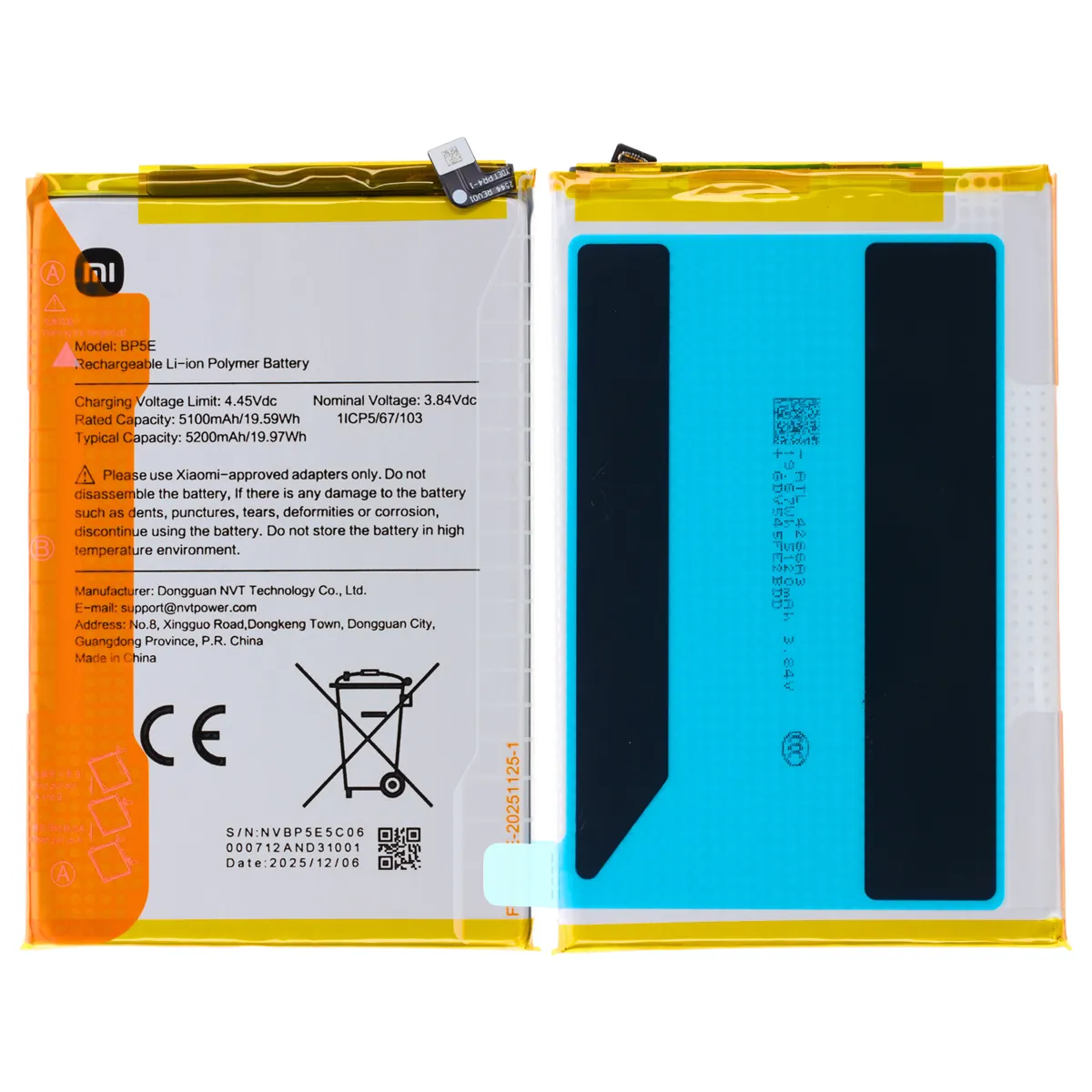
- Part number: BP5E (printed on the battery label)
- Capacity: 5200 mAh typical, 5100 mAh rated, 19.59 / 19.97 Wh (rated / typical)
- Voltage: 3.84 V nominal, Li-ion Polymer; charging voltage limit 4.45 V
- Charging: 15W wired fast charging; no wireless charging on this model
- Signs it needs replacing: phone swelling, battery draining fast, phone switching off at 20–30%, or not holding charge after a full charge
- Warning: a swollen battery must not be punctured or bent — replace it, do not keep using it. And match the code, not just the capacity: the old Redmi 5A (2017) uses battery BN34 (3000 mAh), which does NOT fit this phone. "A5" and "5A" are different phones — always order BP5E for the C71.
If you need the Poco C71 battery, contact us through our Contact page for price and availability.
2. Charging flex / charging board (sub board)
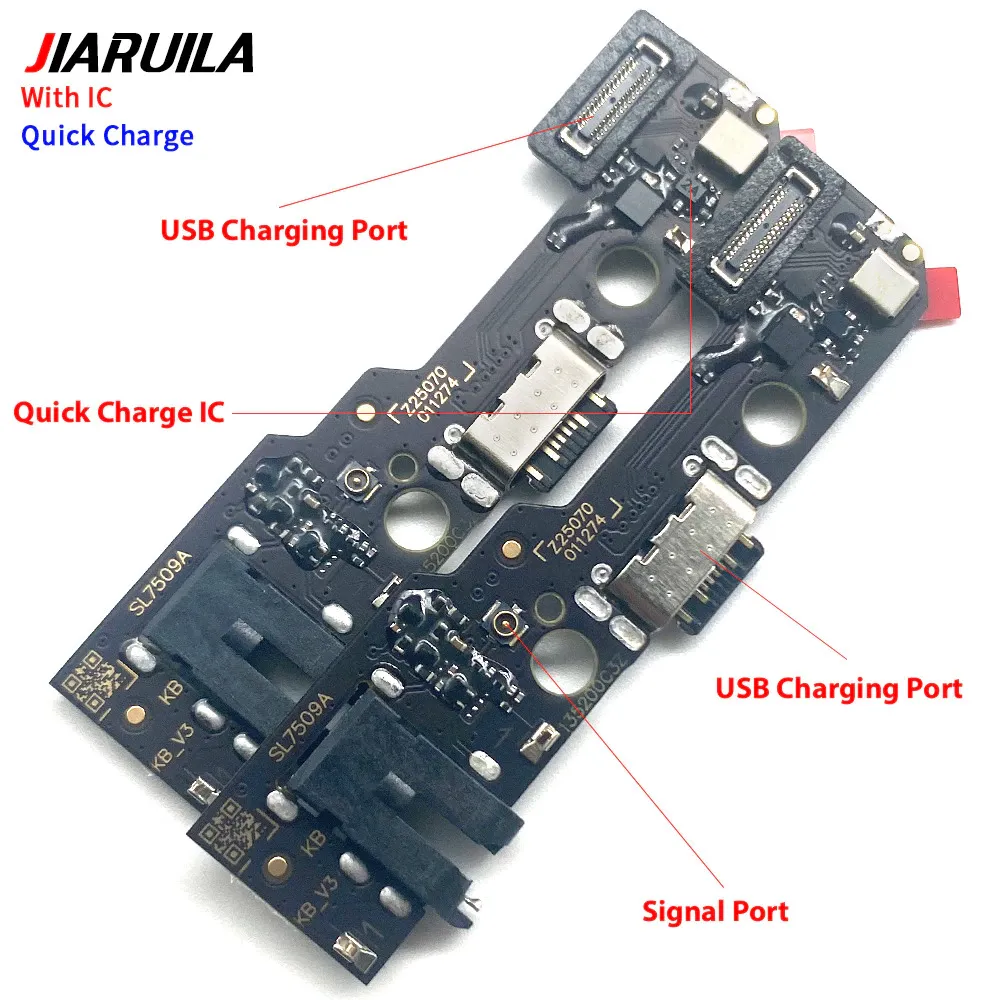
- What it is: the small board at the bottom of the phone carrying the USB-C charging port. It connects to the main board through the long interconnect flex (see section 5).
- Printed marking: Z5070 011274, SL7509A, KB_V3 — visible on the board in the photo above. No Xiaomi service-pack number was verified for this board, so none is printed here.
- Signs it is faulty: phone not charging, charging only at one cable angle, loose USB-C port, or 15W fast charging never kicking in even with the right charger
- Fitting note: the charging board is model-specific to the C71 — a Poco C65 or Poco C75 charging board does not fit, even though the ports look alike
If you need the Poco C71 charging flex, contact us through our Contact page for price and availability.
3. On / off strip — power button + volume flex (side key flex)
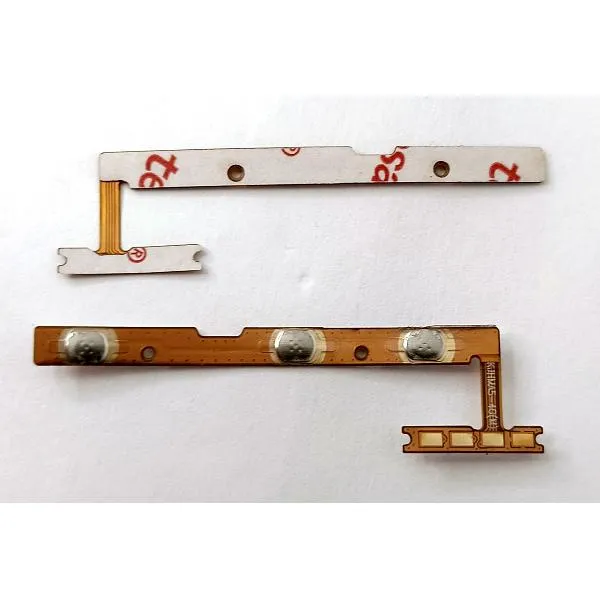
- What it is: one long flex strip carrying both the power (on/off) button and the volume up/down buttons. The power button is also the fingerprint sensor, so this one flex carries both jobs.
- Signs it is faulty: power button not working, fingerprint unlock failing even though the sensor looks clean, volume button stuck or double-pressing, or the phone restarting when a button is pressed
- Fitting note: this is a long, thin flex — it tears easily if pulled at an angle. Fit it with the frame buttons aligned first, then press the flex down, never the other way round
If you need the Poco C71 power button flex, contact us through our Contact page for price and availability.
4. Main board (motherboard)
- Processor: Unisoc T7250 (12 nm), 2x 1.8 GHz Cortex-A75 + 6x 1.6 GHz Cortex-A55, Mali-G57 MP1
- Memory: 3 / 4 / 6 GB RAM; storage 64 GB / 128 GB, plus a dedicated microSDXC slot
- No verified Poco C71 main-board photo was found for this draft, so no board figure is printed — and no Xiaomi service-pack number was verified for this board, so none is printed here. The board carries the cameras, dual SIM, 4G, Wi-Fi, Bluetooth 5.2 and the display/battery/charging connectors — so a board fault can look like a display, charging or network fault. Check the flexes and connectors first; they are cheaper than a board.
- Board-level repairs (no signal, no power, water damage) need a specialist — a board swap also changes the phone's identity, so data and IMEI checks matter before ordering one.
If you need the Poco C71 main board, contact us through our Contact page for price and availability.
5. Long flex (interconnect flex) and LCD flex — do not mix them up
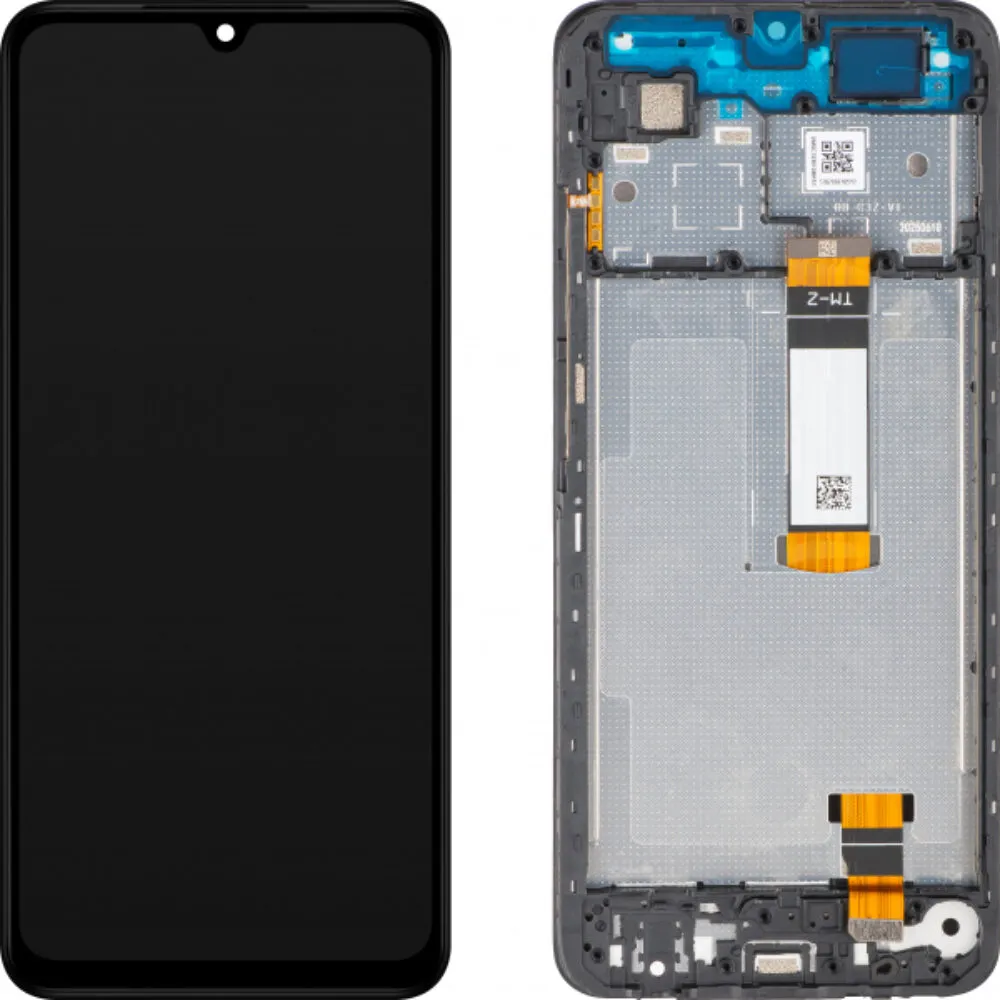
- Long interconnect flex: the long flex that runs between the main board (top) and the charging sub board (bottom). It carries charging, USB data and antenna signals. If it is damaged, the phone may stop charging, lose signal, or show a dead microphone — even though the charging board itself is fine.
- No verified photo or printed code was found for the C71's standalone main interconnect flex, so none is printed here — the photo above shows the display module's own long flex, which is a different part. Do not order a display long flex when the fault is the board-to-charging-board flex.
- LCD flex: the short flex on the back of the display itself (visible in the LCD front/back photo above). It carries the picture and touch signals from the display to the main board. A torn LCD flex means lines, no touch, or a black screen, and it usually means replacing the whole display assembly, not just the flex.
- Rule for ordering: "long flex" on a display listing = the display module's own long flex (Main/SUB ends); "LCD flex" = the flex attached to the screen; "main flex" / "interconnect flex" = the separate board-to-charging-board flex. Sellers sometimes list them under each other's names, so match the picture and the printed code, not just the title.
If you need the Poco C71 long flex or display flex, contact us through our Contact page for price and availability.
6. Body details — frame, back panel, size and weight
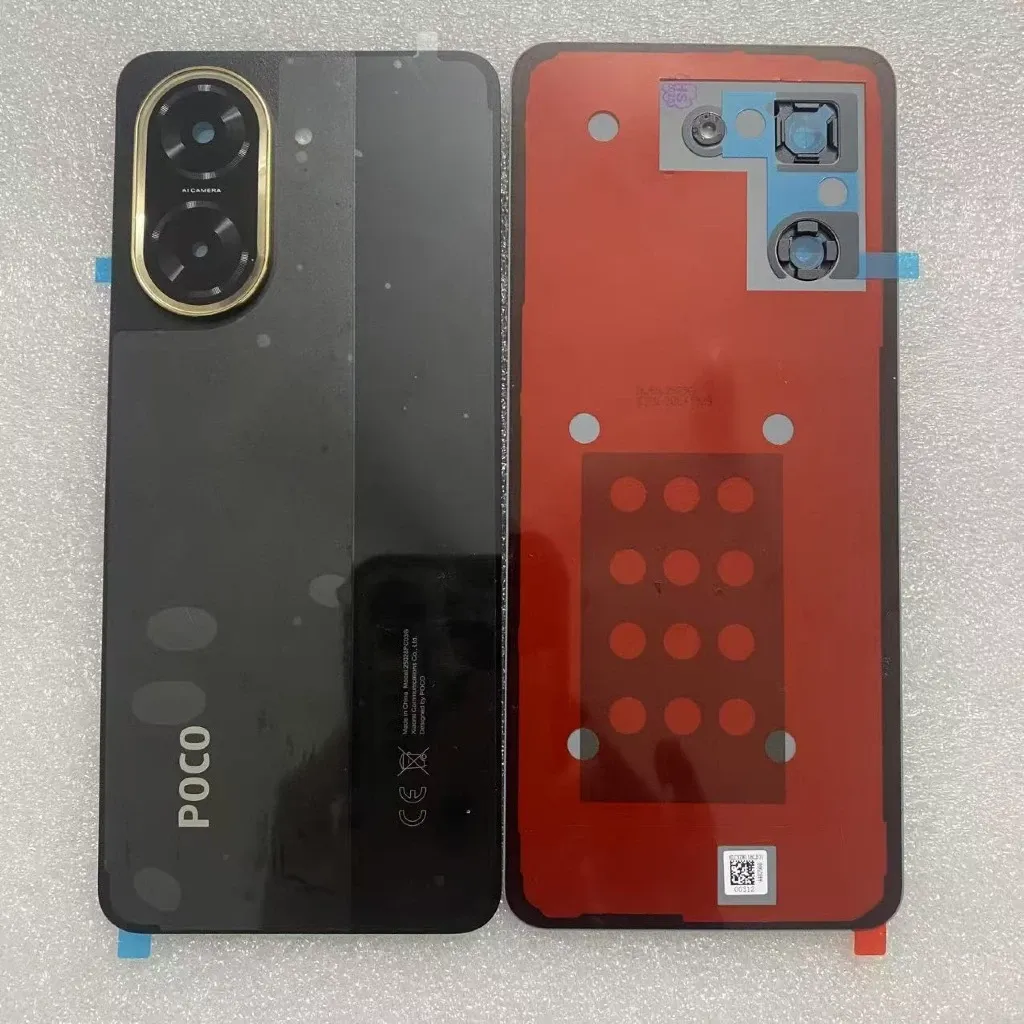
- Size: 171.8 x 77.8 x 8.3 mm; weight: 193 g
- Frame: plastic — flat sides, and at 8.3 mm this is a thick, sturdy budget phone, not a slim one
- Front glass: no glass type is stated by GSMArena or Xiaomi, so none is claimed; back: plastic rear cover (not glass); frame: plastic
- Water resistance: dust and splash resistant (GSMArena) — no IP code is stated, so none is claimed here. This is splash resistance, not the IP68 of a flagship, and the rating is lost once the phone has been opened unless new adhesive seals are fitted
- Colours: Power Black, Cool Blue, Desert Gold (GSMArena); Black, Blue and Gold on Xiaomi's own pages
- Camera island: the two big lenses sit in one vertical pill-shaped island with a gold ring — the quickest visual check that a back panel is a C71 part, and that a phone is a C71 rather than a C65 (whose camera island is shaped differently)
If you need the Poco C71 back glass or body parts, contact us through our Contact page for price and availability.
Why this matters for repair
- A budget LCD panel is the most-replaced part on this phone, so a wrong fitment is a costly return. The C71's 6.88-inch panel, 120 Hz refresh rate and side-mounted fingerprint sensor mean the replacement must be the exact 25028PC03G panel — there is no confirmed substitute, despite the same screen size on the Redmi A5 and the Poco C75, and despite sellers grouping the C71 and A5 panels together.
- Check the part number on every part before fitting: battery BP5E (5100 mAh rated / 5200 mAh typical, 3.84 V); charging board printed Z5070 011274 / SL7509A / KB_V3; display shielding printed TT688-3-C-F356-1-T-1; long-flex display module printed TM-2.
- If the Redmi A5 panel or battery is ever confirmed to share this phone's parts from shop fitment, the finder — and this article — should be updated together, with the same (verify) honesty the site uses elsewhere.
Next articles in the same series (from the most-searched list)
Redmi A5 (the natural next one — its display story links straight into this article), Poco C75, Poco C65, Redmi A3x.