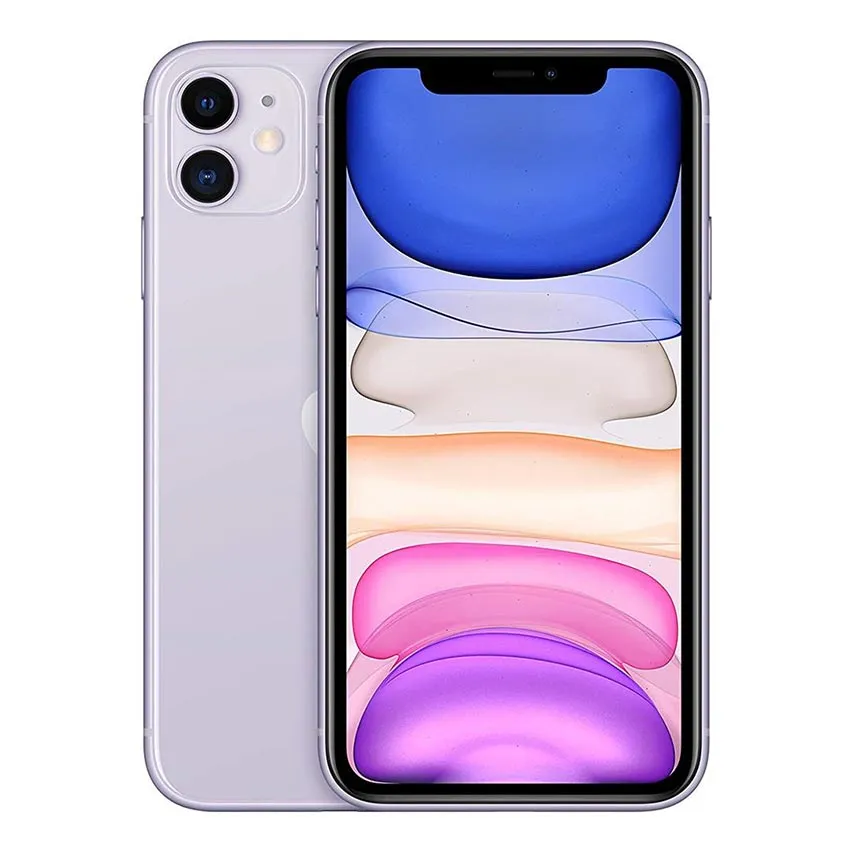
Apple iPhone 11 is the best-selling iPhone of its generation, the successor to the iPhone XR, and still one of the most-repaired iPhones on the bench in 2026 — and it is already on the mobilelcdled.com finder as Apple iPhone 11 (A2111, A2221, A2223, panel type LCD). This guide covers the full phone: display, battery, charging flex, on/off (side key) strip, main board, long flex and body — so a shop or a buyer can check exactly what they are ordering before they pay. It also fills the gap before the iPhone 12, the iPhone 13 and the iPhone 14, which already have their own guides, so the four generations can now be compared side by side.
Most-searched keywords this article answers
iPhone 11 display price, iPhone 11 LCD replacement, iPhone 11 screen replacement, iPhone 11 original display, iPhone 11 LCD screen, iPhone 11 display A2111, iPhone 11 battery replacement, iPhone 11 battery 3110mAh, iPhone 11 charging port repair, iPhone 11 Lightning flex, iPhone 11 power button not working, iPhone 11 on off strip, iPhone 11 side key flex, iPhone 11 motherboard, iPhone 11 logic board, iPhone 11 back glass replacement, iPhone 11 aluminium body parts, iPhone 11 spare parts, iPhone 11 display compatibility, iPhone 11 vs XR display, iPhone 11 vs 12 display difference, iPhone 11 LCD vs OLED.
Display specs
- Model on the finder: Apple iPhone 11 (A2111, A2221, A2223), panel type: LCD
- Screen: 6.1-inch Liquid Retina IPS LCD
- Resolution: 828 x 1792 pixels (~326 ppi)
- Brightness: 625 nits (typical); True Tone and P3 wide colour
- Refresh rate: 60 Hz — no ProMotion on this model; the 120 Hz ProMotion display belongs to the Pro models, not this phone
- Protection: scratch-resistant glass on the front; the iPhone 12 moved to Ceramic Shield, so a 12 panel is a different part
- Notch: the front camera and Face ID sensors sit in the wide notch at the top of the screen. The iPhone 13 notch is about 20% smaller, so a replacement display must have the correct wide iPhone 11 notch, or the Face ID sensors will not sit right
- Fingerprint: none — unlock is Face ID only, so there is no under-display fingerprint sensor to worry about when swapping the display
Full mobile specification
The full specification below is cross-checked against Apple's iPhone 11 technical specifications and the iPhone 11 spec page on GSMArena. Apple's own iPhone 11 specs page returns a redirect now that the model is discontinued, so the GSMArena page is the live cross-check.
Types / variants — which iPhone 11 is which
- Model numbers: A2111 (USA, Canada, Puerto Rico, U.S. Virgin Islands), A2221 (International), A2223 (China, Hong Kong); internal identifier iPhone12,1 — all are the same phone for display and parts purposes; always confirm the exact model number before ordering a part
- Storage + RAM types: 64 GB + 4 GB RAM, 128 GB + 4 GB RAM, 256 GB + 4 GB RAM — every iPhone 11 has 4 GB RAM, so storage size is the only difference between variants
- SIM types: Nano-SIM + eSIM (most markets), dual Nano-SIM (China models)
- Colours: Black, Green, Yellow, Purple, Red, White — the back glass is colour-infused, so a back-glass replacement must match the colour
- Launched: announced 10 September 2019, released 20 September 2019; discontinued 7 September 2022, when the iPhone 14 series launched
- Software: iOS 13 at launch, upgradable to newer iOS versions
Processor details
- Chipset: Apple A13 Bionic (7 nm+) — the same chip family as the iPhone 11 Pro, and faster than the A12 in the iPhone XR
- CPU: hexa-core — 2x 2.65 GHz Lightning performance cores + 4x 1.8 GHz Thunder efficiency cores
- GPU: Apple 4-core GPU; 3rd-generation 8-core Neural Engine
- Note for buyers: the A13 is fast enough for everyday use in 2026, but this phone has no 5G — it is LTE only. The iPhone 12 was the first 5G iPhone
- For repair: the processor is soldered on the logic board, so a processor fault is a board-level repair, not a part swap
RAM and storage details
- RAM: 4 GB in every variant — the same 4 GB as the iPhone 12, and more than the 3 GB in the iPhone XR
- Storage: 64 GB, 128 GB or 256 GB, NVMe fast storage
- No memory card slot: storage cannot be expanded, so a buyer choosing a used iPhone 11 should check the storage size first, because it cannot be changed later — and the 64 GB base model fills up fast
Charging type details
- Wired charging: Lightning, USB 2.0, PD 2.0 — up to 50% charge in 30 minutes with an 18W adapter or higher (sold separately)
- Wireless charging: 7.5W Qi only — there is no MagSafe on this phone. The iPhone 12 was the first iPhone with MagSafe, so a MagSafe charger or wallet will not snap onto an iPhone 11
- Port: Lightning — the iPhone 15 moved to USB-C, so a USB-C flex does not fit this phone and a Lightning flex does not fit the 15
- In practice: a weak or wrong charge-port flex will never deliver full fast-charging speed even with the right charger, and a Lightning flex from another iPhone model does not fit — the iPhone 11 flex is model-specific
Camera details
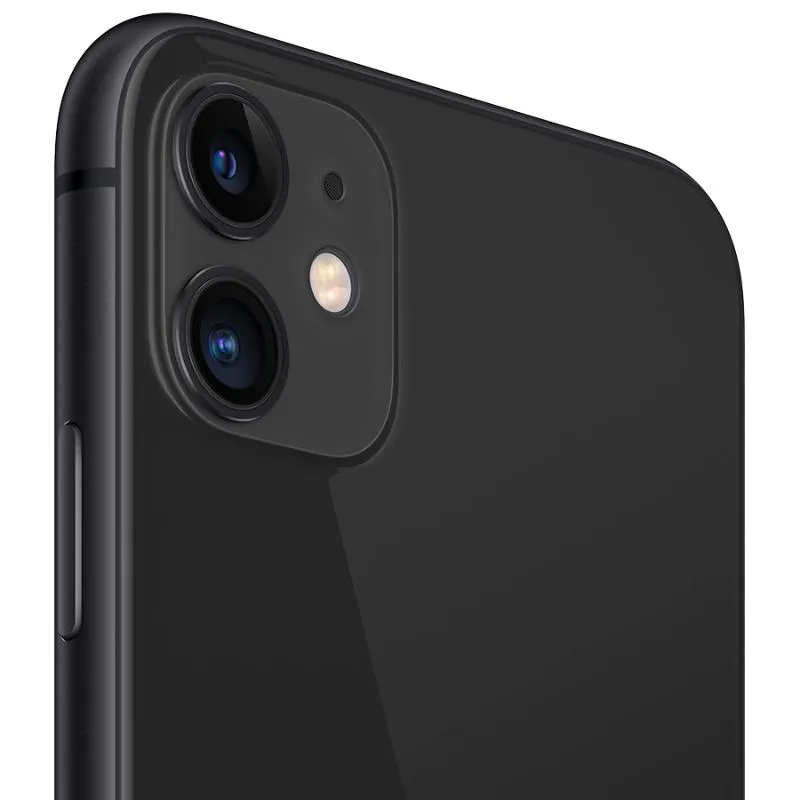
- Rear cameras (dual): 12 MP wide, f/1.8, 26mm, 1.4µm pixels, dual pixel PDAF, optical image stabilisation; 12 MP ultra-wide, f/2.4, 120-degree view, 13mm, 1/3.6-inch sensor
- Rear video: 4K at 24/25/30/60 fps, 1080p at 25/30/60/120/240 fps, HDR, stereo sound recording; dual-LED dual-tone flash, HDR (photo/panorama)
- Front camera: 12 MP wide, f/2.2, 23mm, 1/3.6-inch sensor, 1.0µm pixels, plus the SL 3D depth/biometrics sensor for Face ID; video 4K at 24/25/30/60 fps, 1080p at 25/30/60/120 fps, gyro-EIS; HDR
- Night mode: automatic Night mode on the wide camera, plus Deep Fusion and Portrait mode with depth control — the ultra-wide camera does not have Night mode on this model
- For repair: the two rear lenses sit in a straight vertical line in the square camera module — the same layout as the iPhone 12, so a camera module or a back glass cannot be told apart from a 12 by the lenses alone. Check the frame: the 11 has rounded aluminium sides and is thicker (8.3 mm) and heavier (194 g) than the 12. A cracked lens glass is a back-glass job; a faulty lens itself means the camera module needs attention, not just the glass
Sound details
- Loudspeakers: stereo speakers — one speaker at the bottom, one in the earpiece
- 3.5mm headphone jack: none — audio is via Lightning, Bluetooth 5.0 (A2DP, LE) or wireless earbuds
- Other connectivity: Wi-Fi 6 (802.11 a/b/g/n/ac/6, dual-band, hotspot), NFC, Ultra Wideband (UWB) — the first iPhone with the U1 ultra-wideband chip; GPS / GLONASS / GALILEO / QZSS; no FM radio
- Sensors: Face ID, accelerometer, gyro, proximity, compass, barometer; LTE only, no 5G
Display / LCD — front side and back side pictures
A replacement iPhone 11 display is sold as a full assembly (panel with touch, flex cables and the wide-notch sensor area at the top). It is also sold with frame and without frame. Both are the same 6.1-inch Liquid Retina IPS LCD panel; the fitting work is different, so always confirm which one a seller is quoting — and always confirm the listing says "iPhone 11" (A2111 / A2221 / A2223), not just "11 Pro" or "XR". This phone is LCD, not OLED: any listing that calls an iPhone 11 panel "OLED" is the wrong part, and an OLED panel from the 11 Pro will not fit this phone.
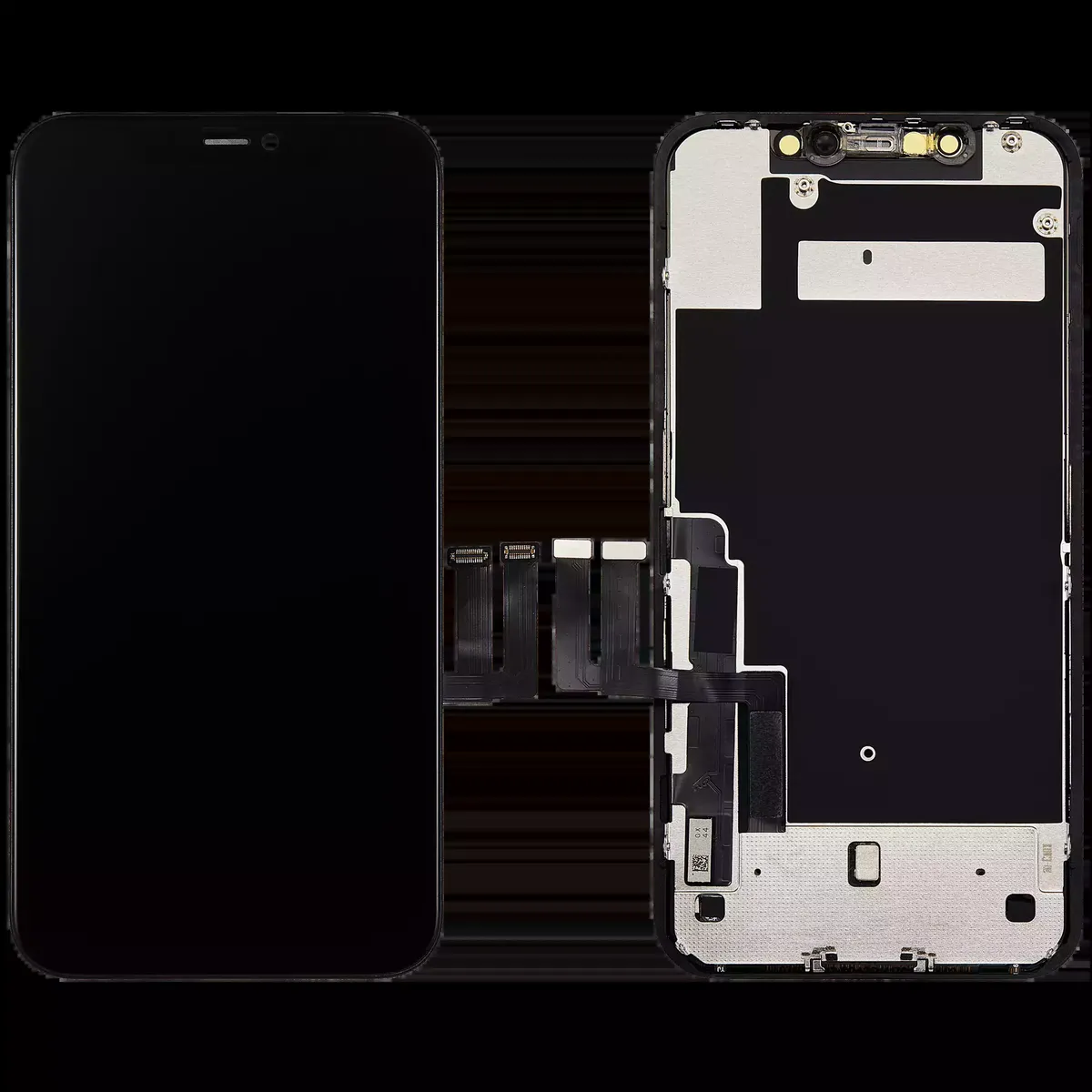
If you need the iPhone 11 display, contact us through our Contact page for price and availability.
What the compatibility finder says — honestly
As of this draft, the finder lists NO compatible models for the iPhone 11 — the compatibility list is empty. That is the honest position from the database: no other model is listed as sharing this display, and no (verify) flag is shown either. Do not fit another model's panel in an iPhone 11 on a seller's word alone.
- NOT compatible: iPhone XR. The XR is the closest look-alike — the same 6.1-inch size and the same 828 x 1792 LCD resolution on paper. But the site's standing iPhone rule is that XR and iPhone 11 displays are NOT interchangeable: different flex and different body. Do not fit an XR panel in an iPhone 11, and do not fit an 11 panel in an XR.
- NOT compatible: iPhone 12. The iPhone 12 is the same 6.1-inch size on paper, but it has an OLED panel (1170 x 2532) instead of LCD, a different flex and a different body — an iPhone 12 panel does not fit an iPhone 11.
- NOT compatible: iPhone 13. The iPhone 13 is the same 6.1-inch size again, but it has an OLED panel (1170 x 2532), a notch about 20% smaller and a different display flex — same size on paper, different part in the hand.
- NOT compatible: iPhone 14. The iPhone 14 is the same 6.1-inch size and the same 1170 x 2532 OLED resolution again, but it has a different display flex and earpiece layout — same size on paper, different part in the hand.
- NOT compatible: iPhone 11 Pro and iPhone 11 Pro Max. The Pro models share the A13 chip and the launch date, but their displays are OLED (5.8-inch on the Pro, 6.5-inch on the Pro Max), not the 6.1-inch LCD of the iPhone 11 — different size, different panel, different part.
- Battery is model-specific too. The iPhone 11 battery is 3110 mAh. Do not fit a battery from the XR (2942 mAh), the 11 Pro (3046 mAh), the 11 Pro Max (3969 mAh) or the iPhone 12 (2815 mAh) on the strength of a similar size — match the model, not just the capacity.
Before ordering an iPhone 11 panel, search the exact model on mobilelcdled.com and check the compatibility list, rather than trusting a seller listing that groups every "11" model together.
Full parts details
1. Battery — 3110 mAh
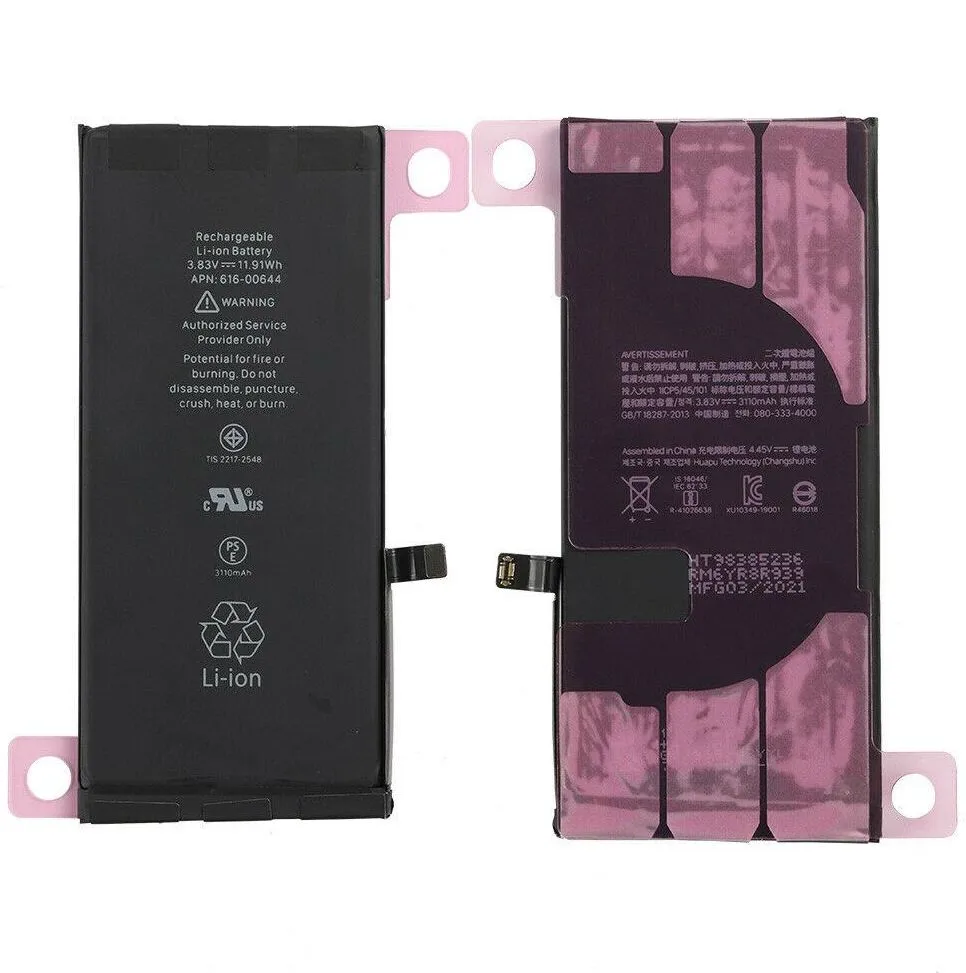
- Capacity: 3110 mAh typical (11.91 Wh), Li-ion, 3.83V — bigger than the iPhone XR battery (2942 mAh) and the iPhone 12 battery (2815 mAh)
- Charging: wired PD 2.0, up to 50% in 30 minutes with an 18W adapter or higher; 7.5W Qi wireless — no MagSafe on this model
- Signs it needs replacing: battery health dropping under 80% in Settings, phone switching off at 20–30%, battery draining fast, or the back glass lifting from a swelling battery
- Warning: a swollen battery must not be punctured or bent — replace it, do not keep using it. On iPhones the battery is glued in with pull-tabs; a battery swap also needs the battery health to be re-paired, or iOS may keep showing the old health figure.
- Part number note: the battery label in the photo reads "Rechargeable Li-ion Battery 3.83V === 11.91Wh APN: 616-00644", 3110mAh — that is the number printed on the cell itself, so match the label and the model when ordering.
If you need the iPhone 11 battery, contact us through our Contact page for price and availability.
2. Charging flex / Lightning charge port flex
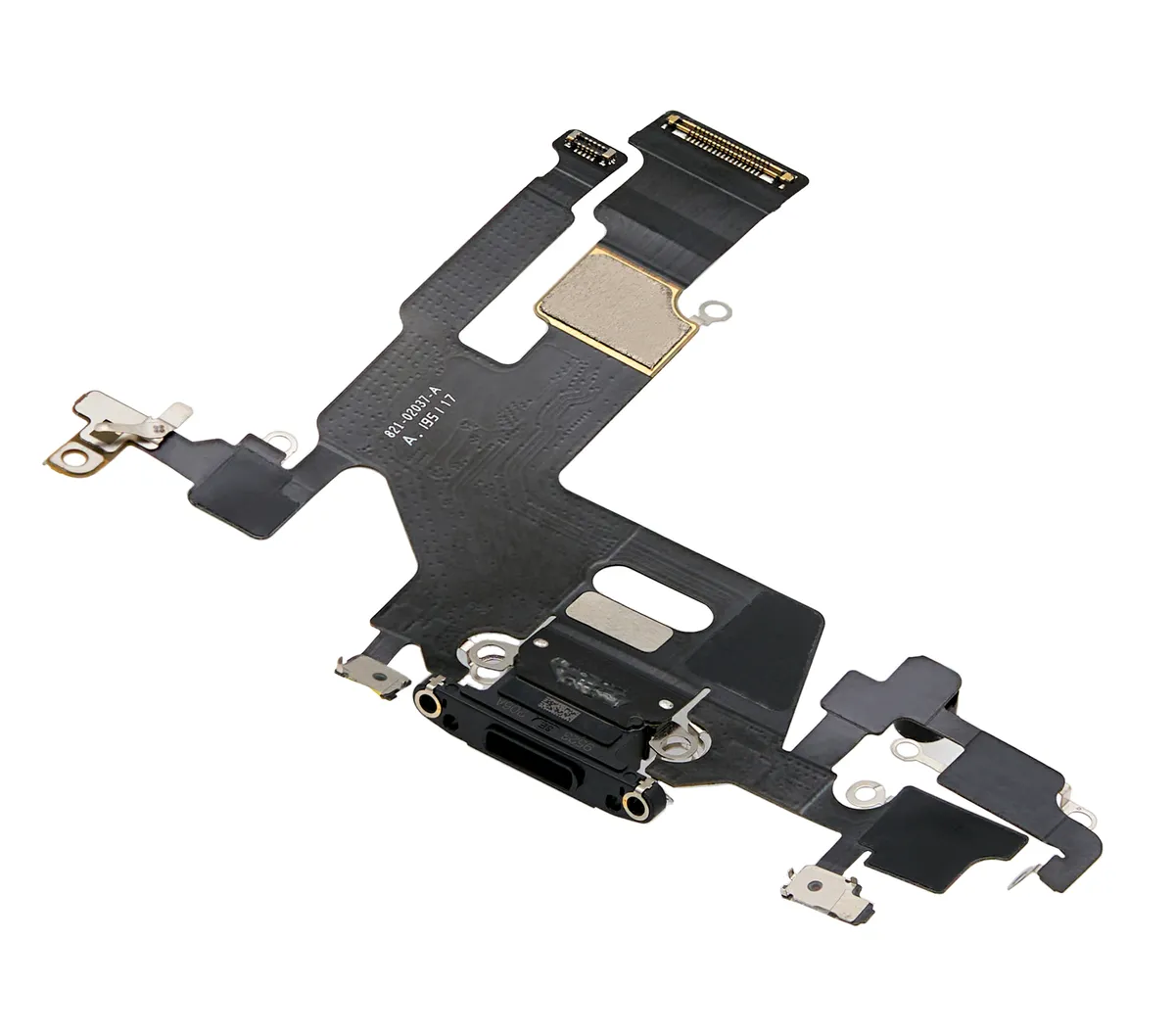
- What it is: the long flex assembly at the bottom of the phone carrying the Lightning charging port. It connects up to the logic board and carries charging, USB data, microphone and antenna signals.
- Signs it is faulty: phone not charging, charging only at one cable angle, loose Lightning port, microphone not working on calls, or fast charging never kicking in even with the right charger
- Fitting note: the charging flex is model-specific to the iPhone 11 — a Lightning flex from the XR, the 11 Pro, the 11 Pro Max, the iPhone 12 or the iPhone 13 does not fit, even though the ports sit in the same place and look the same. The flex is also sold in colour-matched variants for the frame — match the model and the colour, not just the port shape.
- Part number note: the flex in the photo is printed 821-02037-A — that is the marking on the part itself, so match the photo and the model when ordering, not a number from a listing title.
If you need the iPhone 11 charging flex, contact us through our Contact page for price and availability.
3. On / off strip — power button cable (side key flex)
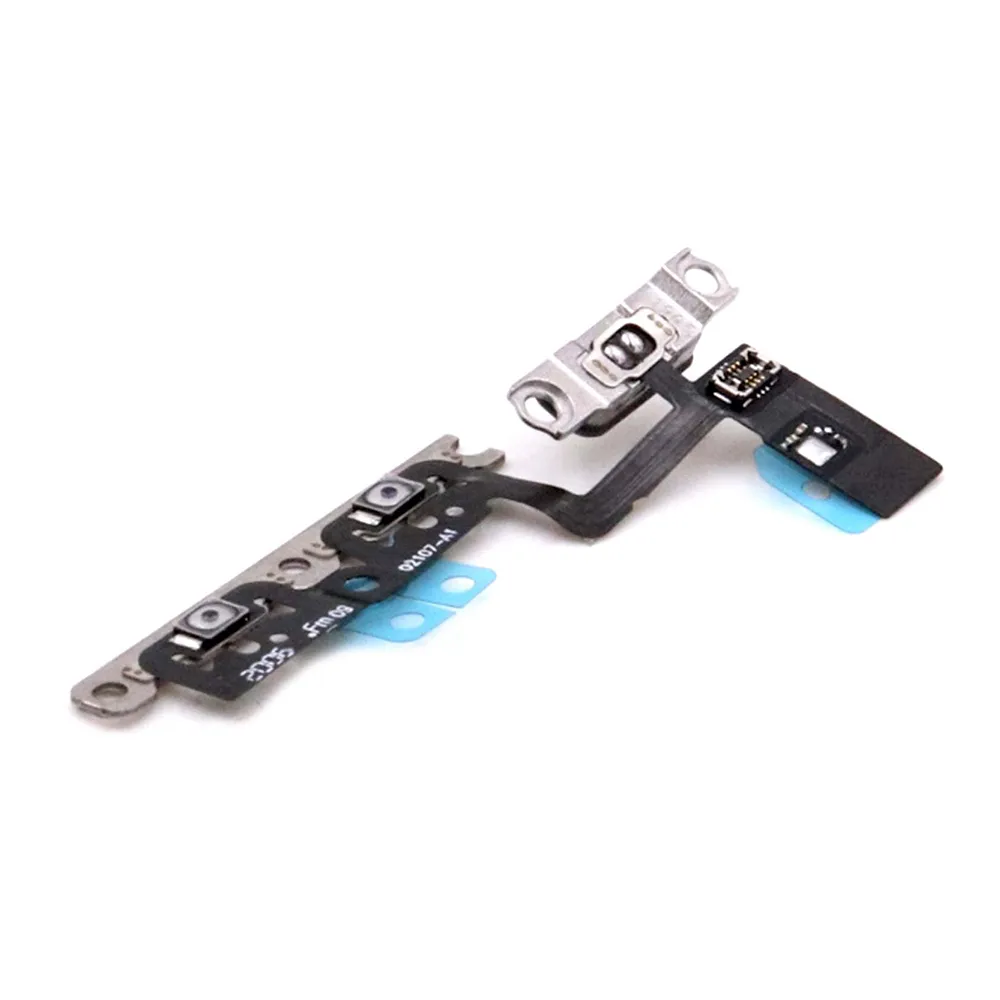
- What it is: the power (on/off) and volume button cable — a long flex strip with the metal brackets that hold it against the frame buttons, plus the antenna contacts that run along the side of the phone.
- Difference between listings: some sellers list the power button cable on its own and some list power and volume together as one assembly (shown above) — match the photo of the cable you are replacing before ordering, and order by model, not by a guessed number.
- Signs it is faulty: power button not working, phone restarting when the button is pressed, volume buttons not working, or no click feeling from the side buttons
- Fitting note: this is a long, thin flex — it tears easily if pulled at an angle. Fit it with the frame buttons aligned first, then press the flex down, never the other way round.
- Part number note: the flex in the photo is printed 821-10720 — that is the marking on the part itself, so match the photo and the model when ordering, not a number from a listing title.
If you need the iPhone 11 power button flex, contact us through our Contact page for price and availability.
4. Main board (logic board)
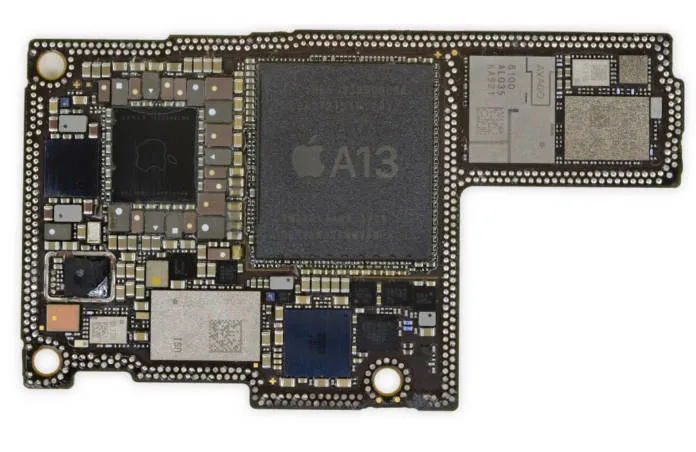
- Processor: Apple A13 Bionic (7 nm+), 4-core GPU, 3rd-generation 8-core Neural Engine
- Memory: 4 GB RAM; storage 64 GB / 128 GB / 256 GB (no microSD slot)
- The board carries the cameras, SIM/eSIM, LTE modem, Wi-Fi 6, Bluetooth 5.0, UWB and the display/battery/charging connectors — so a board fault can look like a display, charging or network fault. Check the flexes and connectors first; they are cheaper than a board.
- Board-level repairs (no signal, no power, water damage) need a specialist — a board swap also changes the phone's identity, so data and IMEI checks matter before ordering one.
- Part number note: no logic-board number was verified for this draft, so none is printed here — do not order by a guessed number.
If you need the iPhone 11 main board, contact us through our Contact page for price and availability.
5. Long flex (interconnect flex) and LCD flex — do not mix them up
- Long interconnect flex: on this iPhone there is no separate Samsung-style long flex between two boards. The job is done by the Lightning charge port flex (section 2 above) — the long flex that runs from the bottom of the phone up to the logic board. It carries charging, USB data, microphone and antenna signals. If it is damaged, the phone may stop charging, lose signal, or show a dead microphone — even though the Lightning port itself looks fine.
- LCD flex: the short flexes on the back of the display itself, visible in the display photo above. They carry the picture and touch signals from the display to the logic board. A torn display flex means lines, no touch, or a black screen, and it usually means replacing the whole display assembly, not just the flex.
- Rule for ordering: "long flex" = the Lightning charge-port flex from the bottom of the phone; "LCD flex" = the flex attached to the screen. Sellers sometimes list them under each other's names, so match the picture, not just the title.
- Part number note: no long-flex or LCD-flex part number was verified for this draft, so none is printed here — do not order by a guessed number.
If you need the iPhone 11 long flex or display flex, contact us through our Contact page for price and availability.
6. Body details — frame, back glass, size and weight
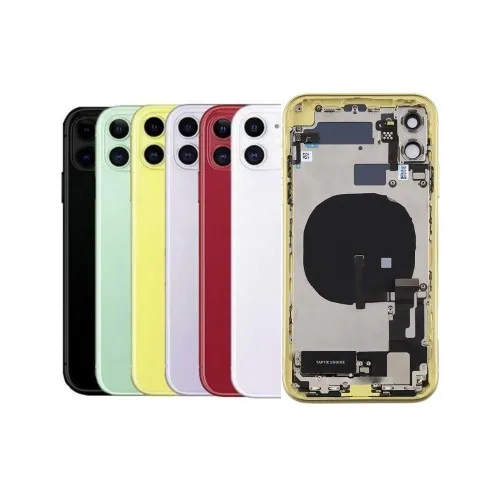
- Size: 150.9 x 75.7 x 8.3 mm; weight: 194 g
- Frame: 7000-series aluminium — rounded sides, thicker and heavier than the flat-sided iPhone 12 (146.7 x 71.5 x 7.4 mm, 164 g)
- Front glass: Corning-made glass; back: colour-infused glass, with the Qi wireless-charging coil built in — no MagSafe ring on this model
- Water resistance: IP68 (up to 2 m fresh water for 30 minutes) — this rating is lost once the phone has been opened unless new adhesive seals are fitted
- Colours: Black, Green, Yellow, Purple, Red, White — the back glass is colour-infused, so a back-glass replacement must match the colour
- Camera module: the two rear lenses sit in a straight vertical line in the square camera module — the same layout as the iPhone 12, so check the frame (rounded sides, 8.3 mm thick) to tell an 11 from a 12, not the lenses. The iPhone 13 moved the lenses to a diagonal layout
If you need the iPhone 11 back glass or body parts, contact us through our Contact page for price and availability.
Why this matters for repair
- The iPhone 11 is one of the most-repaired iPhones on the bench, so a wrong fitment is a costly return. Its 6.1-inch Liquid Retina IPS LCD panel, wide notch and Face ID sensor window mean the replacement must be the exact A2111 / A2221 / A2223 LCD panel — not an OLED panel, and not a look-alike from the XR (same size and resolution on paper, but not interchangeable), the iPhone 12 (same size on paper, OLED, different flex) or the iPhone 13 (same size again, OLED, smaller notch, different flex), despite the same screen size on paper.
- There is no safe display swap on the finder for this model: the compatibility list is empty. The XR is the trap to watch — sellers group the XR and the 11 together because both are 6.1-inch LCD phones, but the site's standing rule is that their displays are not interchangeable.
- Check the part on every part before fitting: battery 3110 mAh (not the XR's 2942 mAh or the iPhone 12's 2815 mAh); charging flex and side-key flex matched by photo and model, not by a guessed part number. The iPhone 11 still uses Lightning and has no MagSafe — the iPhone 15 moved to USB-C — so a USB-C flex from the 15 does not fit this phone either, and a MagSafe charger will not snap onto it.
- If a future model is confirmed to share this display, the finder — and this article — should be updated together, with the same (verify) honesty the site uses elsewhere.
Next articles in the same series (from the most-searched list)
iPhone 12 (the direct successor — same 6.1-inch size, but an OLED panel, flat sides, 5G and MagSafe), iPhone 13 (smaller notch, diagonal cameras and a bigger 3240 mAh battery), iPhone 14 (the last Lightning iPhone most buyers compare it with).